

Table of Contents
Introduction
BIM is no longer optional, because it is the backbone of modern AEC workflows. But when teams skip the basics, things unravel fast. From misaligned models to file chaos, even a small misstep can trigger consequences onsite.
At OAR, we have helped architects, engineers, and project managers get BIM right from day one and adhere to the standards that lead to overwhelming project success. Here are five common BIM mistakes we see, and how to avoid them using practical strategies that deliver smoother, more cost-effective builds.
1. No Federated Model in a Central Platform
The Mistake:
Teams build in silos without a combined model, making coordination impossible.
The Risk:
Architecture, structure, and MEP models do not connect. You miss conflicts, duplicate work, and discover problems too late when they are expensive to fix.
The Fix:
- Use a Common Data Environment (CDE) that supports federated models
- Merge models routinely to detect design clashes early
- Make ISO 19650 compliance your baseline for model sharing and version control
2. Poor or Inconsistent File Naming
The Mistake:
Files are saved with names like “FINAL-v3-update_REAL-final.dwg” or worse.
The Risk:
Files get lost. Team members work off outdated drawings. Coordination breaks down and QA becomes guesswork.
The Fix:
- Define clear naming rules in your BIM Execution Plan (BEP)
- Follow ISO naming standards across folders, files, and model elements
- Use software tools to flag non-compliant names automatically
- Make naming QA a required part of milestone check-ins
3. Clash Detection Done Too Late or Not at All
The Mistake:
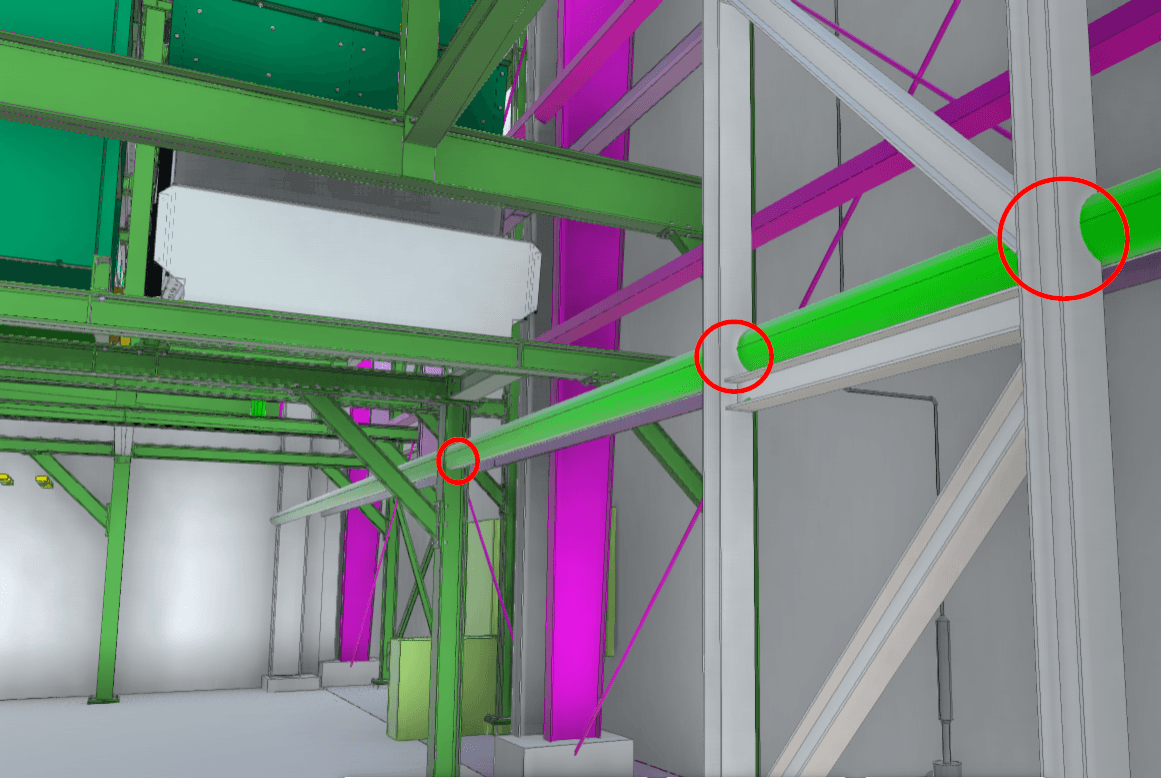
Clash detection is done ad hoc or only after drawings are finalized.
The Risk:
HVAC ducts cut through beams. Electrical gear overlaps piping. Contractors discover problems onsite instead of in the model.
The Fix:
- Run scheduled clash detection with Navisworks, BIM 360, or Solibri
- Start during design and increase frequency during pre-construction
- Prioritize and assign clashes using templates and issue tracking in your CDE
- Use OAR’s workflow with grouped clashes, resolution leads, and progress tracking
4. Misaligned Coordinates
The Mistake:
Each team uses a different origin point or coordinate base. Nothing lines up.
The Risk:
Designs do not align in real-world space. Survey data, site layouts, and prefabrication efforts become unreliable.
The Fix:
- Align all models to real-world coordinates early in design
- Validate coordinate systems in each file before federation
- Use shared reference points and publish alignment protocols in the BEP
- Test model accuracy regularly using control points
5. Lack of Training and Model Adoption
The Mistake:
The model exists but no one uses it, trusts it, or knows how to apply it.
The Risk:
Field teams rely on outdated PDFs. Designers over-model details no one needs. Communication falls apart between trades.
The Fix:
- Offer targeted training for PMs, designers, field teams, and subs
- Host model review workshops to build buy-in and align expectations
- Develop user guides and workflows that are easy to follow
- Create a feedback loop between on-site experience and model updates
Conclusion
BIM itself is not the problem. Issues arise when people skip foundational steps. With the right systems in place, BIM becomes your most powerful tool for eliminating risk, saving money, and improving build quality.
At OAR, we specialize in making BIM work across the full project lifecycle. From setting up CDEs to running clash detection and validating models, we have seen that early planning prevents expensive problems later.
Ready to get BIM right?
Let’s talk about your project and how to set it up for success.
FAQs
What is a federated BIM model?
It is a combined model that merges all trades—architecture, structure, MEP—into one file for coordination and clash detection.
Why are naming standards so important?
They create consistency, reduce confusion, and help everyone work from the same version of the truth.
How often should we do clash detection?
Ideally every week during design and pre-construction. Increase frequency if your models are changing rapidly.
What is the best way to avoid coordinate mismatches?
Start with a shared coordinate system in your BEP and test alignment before uploading files to the model.
Who needs BIM training?
Everyone who works with the model—designers, project managers, field crews, and subcontractors.