


A Revit model can look complete and still contain issues that affect coordination, documentation, and project delivery.
Missing elements, inconsistent parameters, unresolved warnings, and incorrect model alignment can create problems when multiple teams start working with the same information.
Revit QA/QC (Quality Assurance and Quality Control) is the process of establishing model quality requirements and checking whether a Revit model meets them. It helps teams identify modeling issues, verify information, and prepare models for their intended use.
Quality Assurance (QA) focuses on preventing problems through standards and procedures. Quality Control (QC) focuses on reviewing model information, identifying issues, and verifying corrections.
Effective QA/QC combines both approaches throughout the modeling process, rather than relying on a single review before delivery.
This guide covers eight practical checks that BIM managers, engineers, and modeling teams can use to improve model quality and prepare information for BIM coordination.
Table of Contents
1. Establish Clear BIM Modeling Standards
A reliable QA/QC process starts with clear expectations.
Before modeling begins, project teams should define how information will be created, organized, reviewed, and exchanged.
Without consistent standards, models from different contributors may use incompatible naming conventions, parameters, coordinate systems, or levels of detail.
A BIM Execution Plan (BEP), when applicable, can establish the requirements for each discipline and project milestone.
Key checks:
- Confirm project units, levels, grids, and coordinate requirements.
- Review naming conventions for models, families, views, and sheets.
- Define the required Level of Development (LOD) and Level of Information (LOI).
- Identify required project parameters and classifications.
- Establish file exchange formats and model delivery requirements.
- Clarify who is responsible for model review and issue resolution.
These standards should reflect the project’s intended use.
For example, a model developed for general coordination may have different information requirements than one prepared for detailed fabrication or existing-condition documentation.
Why it matters: Clear standards help teams exchange consistent information and reduce unnecessary corrections during coordination.
2. Review Revit Model Health
Model health is an important part of Revit QA/QC.
A model can contain warnings, unnecessary content, duplicated elements, or inconsistent information that makes it more difficult to manage.
Revit includes built-in features that help teams identify potential issues.
Review warnings
Use Revit’s warning review tools to identify conditions that require attention.
Warnings should be assessed according to their impact on the model and the project’s requirements.
Not every warning represents a critical issue. However, unresolved warnings should not be ignored simply because the model appears to function correctly.
Check model organization
Review whether families, views, worksets, and other model components are organized according to the agreed standards.
Unused content may be removed when appropriate, but cleanup should not affect information needed for the project.
Review model data
Check schedules and parameters for missing values, inconsistencies, or incorrect element assignments.
Key checks:
- Review warnings and document relevant findings.
- Check for unnecessary or duplicated model elements.
- Verify family and workset organization.
- Identify missing or inconsistent parameter values.
- Review model links and their current versions.
- Confirm that model cleanup does not remove required content.
Tools such as Autodesk Model Checker can support defined model health checks. The checks available depend on the configuration and requirements of each project.
Why it matters: Regular model health reviews can help identify technical issues before they affect other project activities.
3. Follow a Consistent Revit QA/QC Checklist
A checklist helps teams review models using consistent criteria.
Instead of relying only on individual experience, reviewers can follow a structured process that reflects the project’s scope and deliverables.
A checklist should be completed at relevant milestones and updated when project requirements change.
Revit QA/QC Checklist
| Review Area | What to Check |
|---|---|
| Model setup | Units, levels, grids, and project information |
| Coordinates | Shared coordinates and model positioning |
| Model organization | Naming conventions, families, views, and worksets |
| Model health | Warnings, unnecessary content, and inconsistent elements |
| Geometry | Element placement, alignment, and relevant dimensions |
| Parameters | Required data fields, classifications, and schedules |
| Model links | Correct references, versions, and positioning |
| Completeness | Required elements and areas within the agreed scope |
| LOD and LOI | Model detail and information meet project requirements |
| Documentation | Sheets, annotations, views, and references |
| Coordination readiness | Exchange requirements, known limitations, and unresolved issues |
The purpose of a checklist is not simply to mark every item complete.
It should help reviewers identify what needs attention, assign responsibility, and document how issues are resolved.
For example, if a model contains missing equipment information, the reviewer should identify the affected elements and communicate the finding to the responsible team.
Once the information is corrected, the relevant check should be repeated.
Why it matters: A consistent checklist supports more reliable reviews and creates a clearer record of model quality.
4. Include Independent Reviews at Key Milestones
Model authors understand their work, but that familiarity can make certain issues harder to notice.
An independent review provides another perspective before model information moves to the next project stage.
Depending on project complexity, independent checks may be appropriate after major modeling milestones, before coordination, or before final delivery.
Key checks:
- Verify that the model meets its intended scope.
- Review unresolved warnings and previously identified issues.
- Confirm that required geometry and data are present.
- Check compliance with project modeling requirements.
- Review known assumptions and limitations.
- Verify that corrections have been completed where required.
Review responsibilities should be defined for each project.
The person checking a model should have the appropriate technical knowledge and understand the intended use of the deliverable.
For larger or more complex projects, additional review checkpoints can help identify issues before modeling progresses too far.
Why it matters: Independent reviews support consistent model quality and reduce reliance on a single person’s interpretation.
5. Compare Model Geometry Against Reliable Reference Data
Revit QA/QC can extend beyond reviewing the model’s internal structure.
For renovation, retrofit, and existing-condition projects, model geometry may need to be compared with measured field conditions.
3D Laser Scanning can provide point cloud information representing the physical conditions captured during a site survey.
When the project scope requires it, this information can be used to evaluate how modeled geometry relates to the measured environment.
Model-to-Point-Cloud Verification
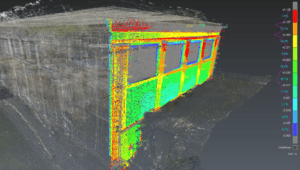
A model-to-point-cloud comparison can help teams identify:
- Missing modeled elements within the agreed scope.
- Differences between modeled and measured geometry.
- Incorrect element positioning or alignment.
- Areas that require additional review.
- Conditions that may affect downstream coordination.
Tools such as Cintoo can support visual comparisons between point cloud data and BIM models.
Other specialized tools may also be appropriate depending on the project’s requirements.
However, a geometric difference does not automatically mean that a model is incorrect or that construction work is unacceptable.
The significance of a measured difference depends on the reference data, alignment quality, agreed tolerances, project scope, and technical requirements.
The professionals responsible for design, engineering, construction, or acceptance determine whether a finding requires action.
OAR supports projects involving 3D Laser Scanning, Scan-to-BIM, and model-based coordination.
Depending on project requirements, quality review can include model health checks, comparisons with measured field conditions, and verification of model completeness.
These activities help provide project teams with better information for coordination and delivery.
For more information about preparing models from point cloud data, read Point Cloud to Revit: What Makes a Scan-to-BIM Model Actually Usable.
Why it matters: Comparing modeled geometry with reliable reference information helps teams understand differences between the model and the physical environment.
6. Automate Repetitive Model Quality Checks
Some Revit QA/QC tasks involve checking the same requirements across many elements or model files.
Automation can help teams perform repetitive checks more consistently.
Depending on the software environment, automated checks may help identify:
- Missing required parameters.
- Incorrect naming conventions.
- Inconsistent model classifications.
- Empty or invalid data fields.
- Defined model organization issues.
- Repeated conditions that require review.
Tools such as Dynamo and model-checking applications can support these workflows.
Automation should be configured according to the project’s requirements and reviewed before the results are used.
Not every quality issue can be identified through predefined rules.
For example, a rule may detect an empty parameter, but determining whether the missing information affects coordination may require technical judgment.
Automated checks support QA/QC; they do not replace professional review.
Why it matters: Appropriate automation can reduce repetitive checking and help technical teams focus on more complex issues.
7. Track Issues, Corrections, and Model Versions
Finding a model issue is only part of the QA/QC process.
Teams also need to document the finding, communicate the required action, and verify the result.
A structured issue-management process helps prevent unresolved findings from being overlooked during model exchanges.
A Practical Model Issue Review Process
- Identify the issue during model review.
- Document its location, description, and relevant references.
- Assign the issue to the responsible team member or discipline.
- Review and implement the required correction.
- Verify the updated information.
- Record the outcome and close the issue when appropriate.
Teams may use model coordination platforms, shared issue registers, or other project management tools to manage this information.
Keeping a record of resolved issues can help maintain traceability throughout the project.
Model Version Control
Version control is equally important.
Before reviewing or exchanging a model, confirm:
- The correct version is being used.
- Referenced models are current.
- Relevant changes are documented.
- Previous QA/QC findings have been addressed.
- Known unresolved issues are communicated.
A review performed on an outdated model may not reflect the information currently being used by the project team.
Why it matters: Documented corrections and version control support traceability and reduce confusion during coordination.
8. Prepare the Model for BIM Coordination and Delivery
The final QA/QC review should consider what the receiving team needs from the model.
A model may meet certain internal quality requirements but still be unsuitable for a specific coordination or delivery task.
Before exchanging a model, teams should confirm that its geometry, information, references, and limitations align with the intended use.
Before Sharing a Revit Model for Coordination
Ask these questions:
- Does the model include the agreed project scope?
- Are coordinates, levels, and references consistent?
- Have relevant model warnings been reviewed?
- Are required parameters and classifications available?
- Have known geometry and completeness issues been evaluated?
- Are unresolved issues and assumptions documented?
- Is the correct model version being delivered?
- Does the receiving team understand the model’s intended use and limitations?
For multidisciplinary projects, coordination requirements may also include a clash matrix, agreed tolerances, issue responsibilities, and review milestones.
These requirements should be defined by the project team.
Clash detection is one component of coordination, but it does not independently establish that a model meets every design, construction, or acceptance requirement.
Why it matters: Preparing models for their intended use helps different disciplines work with clearer and more consistent project information.
How Revit QA/QC Supports Better BIM Coordination
Revit QA/QC and BIM coordination are closely connected, but they are not the same activity.
QA/QC focuses on whether a model meets defined quality requirements.
BIM coordination considers how information from multiple disciplines and sources works together.
A model with inconsistent coordinates, missing elements, or unreliable information can create additional work during coordination.
Reviewing these conditions before model exchange helps teams identify potential problems earlier.
For projects involving existing facilities, model verification may also include comparisons with measured field conditions.
This can be particularly relevant when planning renovations, equipment installations, or work in complex industrial environments.
At OAR, our BIM Coordination & Virtual Construction and Digital Delivery & Implementation services help project teams work with model information across different stages of project delivery.
Our focus is on supporting the practical use of project information, from understanding existing conditions to preparing models for coordination and downstream workflows.
Need support preparing BIM models for coordination or working with existing-condition information?
Explore OAR’s BIM Coordination & Virtual Construction services or contact our team to discuss your project’s requirements.
Frequently Asked Questions
What is Revit QA/QC?
Revit QA/QC is the process of establishing quality requirements and checking whether a Revit model meets them. Reviews may include model warnings, geometry, coordinates, parameters, documentation, and readiness for coordination.
What is the difference between QA and QC in BIM?
Quality Assurance focuses on the standards and procedures used to prevent problems. Quality Control focuses on reviewing information, identifying issues, and verifying that deliverables meet defined requirements.
What should a Revit QA/QC checklist include?
A Revit QA/QC checklist typically includes model setup, coordinates, levels, grids, warnings, naming conventions, families, parameters, model links, geometry, completeness, and documentation. Specific requirements depend on the project.
How do you check a Revit model before BIM coordination?
Confirm the model scope, positioning, version, required information, and relevant warnings. Review geometry, model links, and unresolved issues, then verify that the model meets the agreed coordination requirements.
What tools are used for Revit QA/QC?
Revit’s built-in checking features, Autodesk Model Checker, Dynamo, and specialized BIM review tools may support different aspects of QA/QC. Model coordination or point cloud comparison tools may also be used when required.
Can Revit QA/QC be automated?
Some repetitive checks, such as identifying missing parameters or inconsistent naming, can be automated. However, model quality also requires technical review and project-specific judgment.
How does point cloud data support Revit QA/QC?
Point cloud data provides measured geometric information that can be compared with modeled conditions. This helps identify differences in alignment, geometry, or completeness within the agreed project scope.
Is QA/QC the same as clash detection?
No. QA/QC evaluates model quality against defined requirements. Clash detection identifies geometric conflicts between model elements. Clash detection may be part of a broader QA/QC or coordination process.
When should Revit QA/QC be performed?
Checks should be performed throughout model development, at relevant project milestones, after significant changes, and before important model exchanges or deliveries.
Does passing QA/QC mean a model is construction-ready?
Not necessarily. Passing defined QA/QC checks indicates that the model meets the criteria reviewed. Construction readiness also depends on the project’s requirements, approvals, and decisions made by the responsible professionals.